
💭
Memory
Remembers who's in the room, their personalities and what you talked about recently.
💸 No software fees, no subscription. Just pay for the tokens you use.
Run your own chatbot on Discord, Telegram, Slack, QQ, LINE and your website, and set it all up in a simple dashboard. Mochi remembers people, answers from your docs, looks things up and reads images.
Models come from Flatkey, Mochi's only supported model provider: official models at least 20% below official pricing, one key for all of them.

Keep this page open and follow along. Check off each step: your progress is saved in this browser, so you can come back any time.
The easiest way to try Mochi. Your bots are online while your computer is on.
Copy this prompt into an AI that can run commands on your computer (Claude Code, Codex, Cursor) and it does the steps for you. A chat AI like ChatGPT, Claude or Gemini will walk you through them.
Help me install Mochi, an open-source, self-hosted AI chatbot, on this computer: https://github.com/flatkey-ai/Mochi-ai-chatbot
I'm not technical, so do as much as you can yourself and explain each step simply. Talk to me in English.

1. Run Mochi's one-line installer for my system. It's open source; read it first if you like (https://github.com/flatkey-ai/Mochi-ai-chatbot/tree/main/website/public). It installs Node.js if needed, downloads Mochi into a `mochi` folder in my home folder, starts it and opens the dashboard.
   - macOS / Linux: `curl -fsSL https://www.mochichatbot.com/install.sh | bash`
   - Windows PowerShell: `$p = Get-ExecutionPolicy -Scope Process; Set-ExecutionPolicy Bypass -Scope Process -Force; try { irm https://www.mochichatbot.com/install.ps1 | iex } finally { Set-ExecutionPolicy $p -Scope Process -Force }`
2. Keep it running. Open http://localhost:3000/dashboard and help me choose an admin password (the dashboard asks the first time).
3. If anything fails, fall back to the README's Quick start: clone the repo, `npm install`, copy `.env.example` to `.env`, `npm start`.
4. Mochi uses Flatkey as its model provider. Send me to https://console.flatkey.ai/keys?utm_source=mochi_bot&utm_medium=mochi_site&utm_campaign=mochi&utm_content=ai_prompt to create an API key and top up my balance. Then have me paste the key into the dashboard under "Flatkey API key" and click "Bind key". Never ask me to paste the key into this chat.
5. Help me connect a channel (Discord, Telegram, Slack, QQ, LINE or the website widget) by following the guide inside the dashboard's Channels page, then send the bot a test message.

If something fails, read the error, fix it and keep going. Use the README in the repo as the source of truth.
Or follow the steps yourself
Copy this one line into your terminal and press Enter. It installs Node.js if you don't have it, downloads Mochi into a mochi folder in your home folder, starts it and opens the dashboard. The first time, the dashboard asks you to choose an admin password. Keep the window open: closing it stops Mochi.
Open Terminal (Applications > Utilities), paste this and press Enter.
curl -fsSL https://www.mochichatbot.com/install.sh | bashThe script only installs Node.js (if needed) and Mochi into your home folder, then starts it. Nothing runs as admin unless Node.js itself needs installing, and you can read every line first. Read the script: install.sh ↗
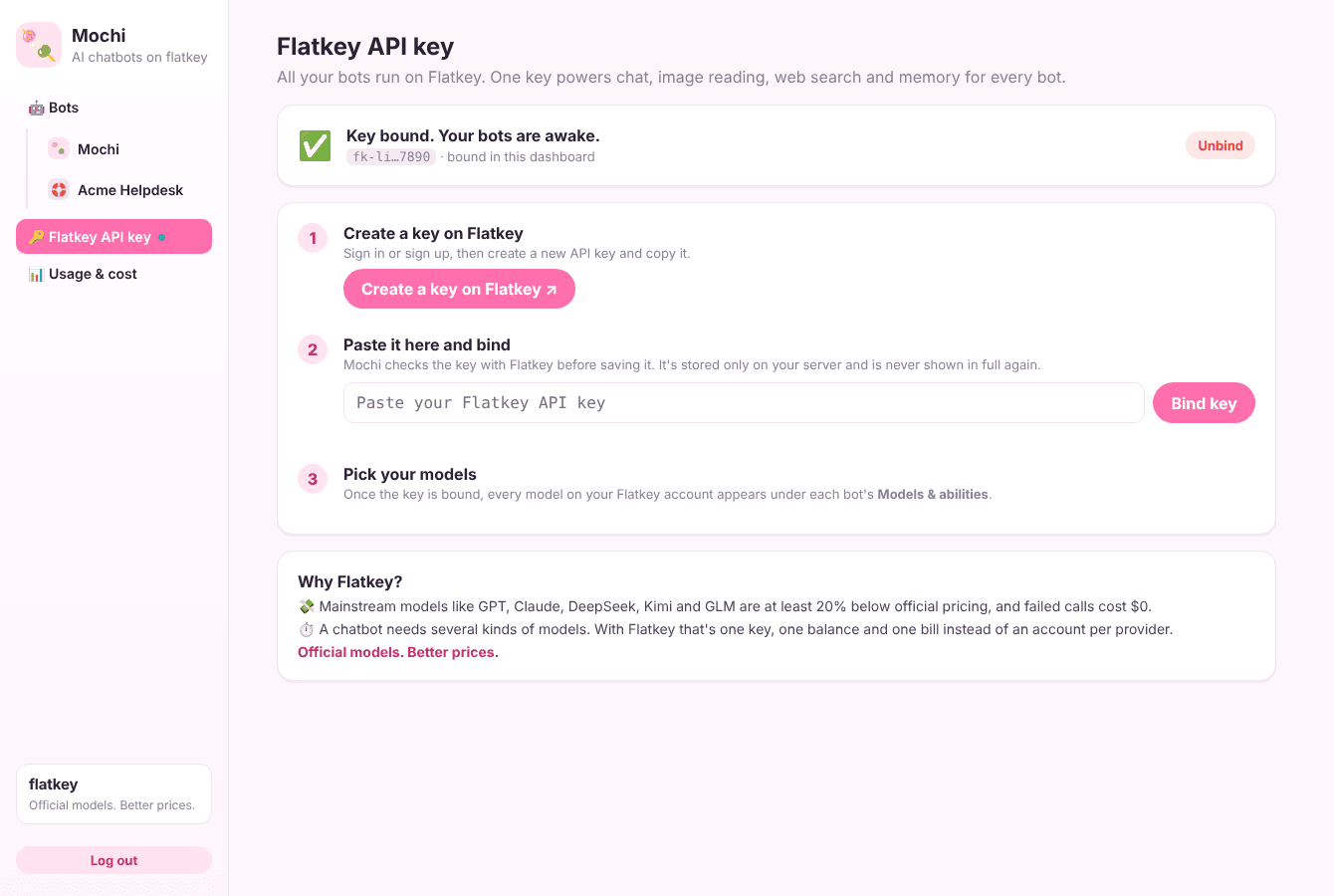
Flatkey is Mochi's model provider. Create an API key and top up your balance: your bots' replies are paid from it.
In the dashboard, open Flatkey API key, paste your key and click Bind key. Mochi checks it and keeps it only on your computer.
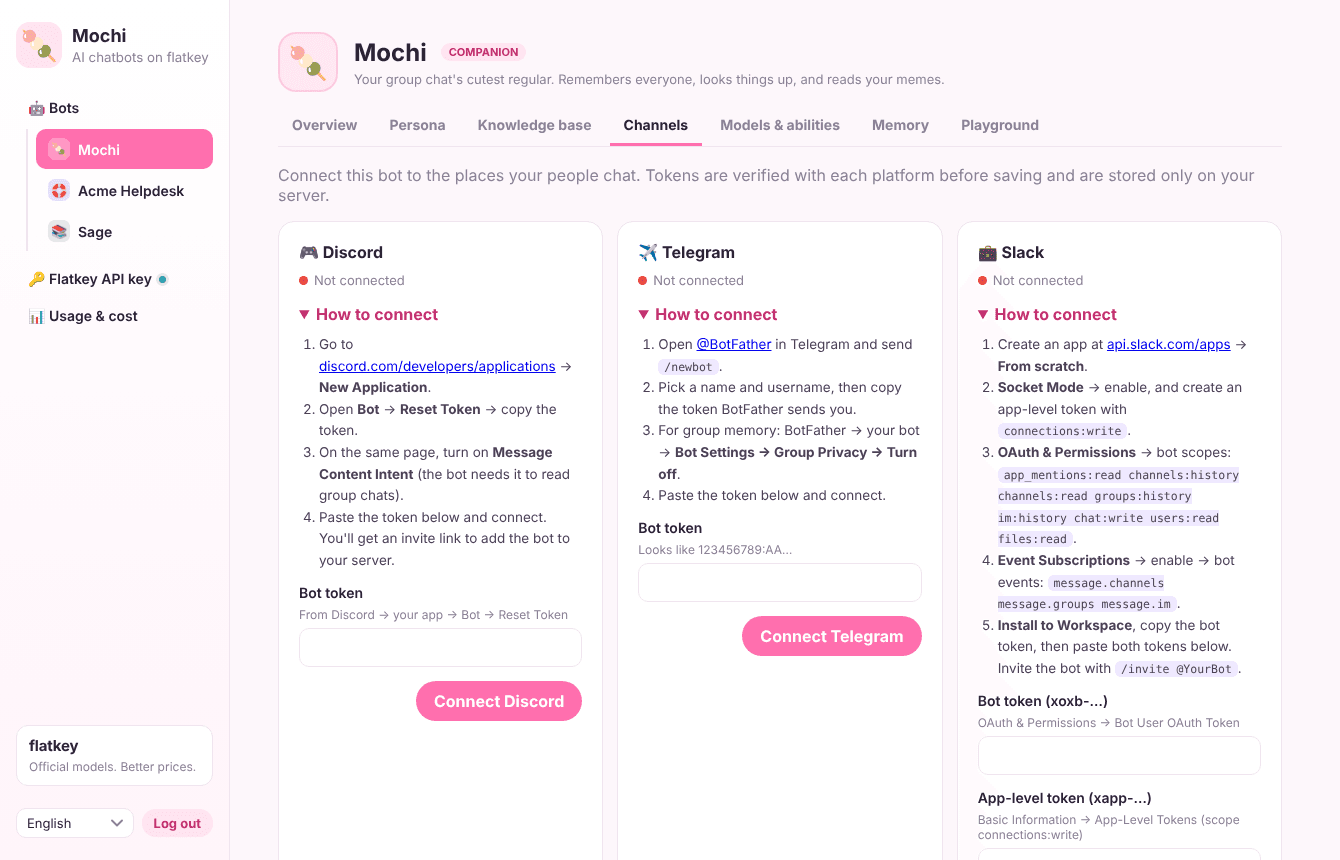
Open Channels and pick Discord, Telegram, Slack, QQ, LINE or the website widget. Each one has its own step-by-step guide in the dashboard. Then send your bot a message.
Keeps your bots online all the time. You need a Linux server with Docker.
Copy this prompt into an AI that can run commands on your computer (Claude Code, Codex, Cursor) and it does the steps for you. A chat AI like ChatGPT, Claude or Gemini will walk you through them.
Help me install Mochi, an open-source, self-hosted AI chatbot, on my Linux server with Docker: https://github.com/flatkey-ai/Mochi-ai-chatbot
I'm not technical, so do as much as you can yourself and explain each step simply. Talk to me in English.

1. Make sure Git and Docker are installed on the server. If not, install them.
2. Clone the repo, copy `.env.example` to `.env` and set PUBLIC_URL to the server's public address (leave ADMIN_TOKEN empty).
3. Build and start it: `docker build -t mochi .` then `docker run -d --name mochi --restart unless-stopped --env-file .env -p 3000:3000 -v mochi-data:/app/data mochi`. Help me put HTTPS in front of port 3000 (for example with Caddy). Then run `docker logs mochi` for the one-time setup code, open /dashboard and help me choose an admin password.
4. Mochi uses Flatkey as its model provider. Send me to https://console.flatkey.ai/keys?utm_source=mochi_bot&utm_medium=mochi_site&utm_campaign=mochi&utm_content=ai_prompt to create an API key and top up my balance. Then have me paste the key into the dashboard under "Flatkey API key" and click "Bind key". Never ask me to paste the key into this chat.
5. Help me connect a channel (Discord, Telegram, Slack, QQ, LINE or the website widget) by following the guide inside the dashboard's Channels page, then send the bot a test message.

If something fails, read the error, fix it and keep going. Use the README in the repo as the source of truth.
Or follow the steps yourself
Any Linux server with Docker works; a small VPS is enough. Prefer a managed cloud with HTTPS included? Follow the Sealos guide instead.
Connect to your server with SSH and run these commands. When .env opens, set PUBLIC_URL to your server's address and save. You can leave ADMIN_TOKEN empty.
git clone https://github.com/flatkey-ai/Mochi-ai-chatbot.git
cd Mochi-ai-chatbot
cp .env.example .env
nano .env
docker build -t mochi .
docker run -d --name mochi --restart unless-stopped --env-file .env -p 3000:3000 -v mochi-data:/app/data mochiRun docker logs mochi to see the one-time setup code, then go to http://YOUR-SERVER:3000/dashboard and choose your admin password (it asks for the code). Before sharing the address, put HTTPS in front of it, for example with Caddy or Cloudflare.
Flatkey is Mochi's model provider. Create an API key and top up your balance: your bots' replies are paid from it.
In the dashboard, open Flatkey API key, paste your key and click Bind key. Mochi checks it and keeps it only on your server.
Open Channels and pick Discord, Telegram, Slack, QQ, LINE or the website widget. Each one has its own step-by-step guide in the dashboard. Then send your bot a message.
Turn each ability on or off per bot, and pick the model behind it.
Remembers who's in the room, their personalities and what you talked about recently.
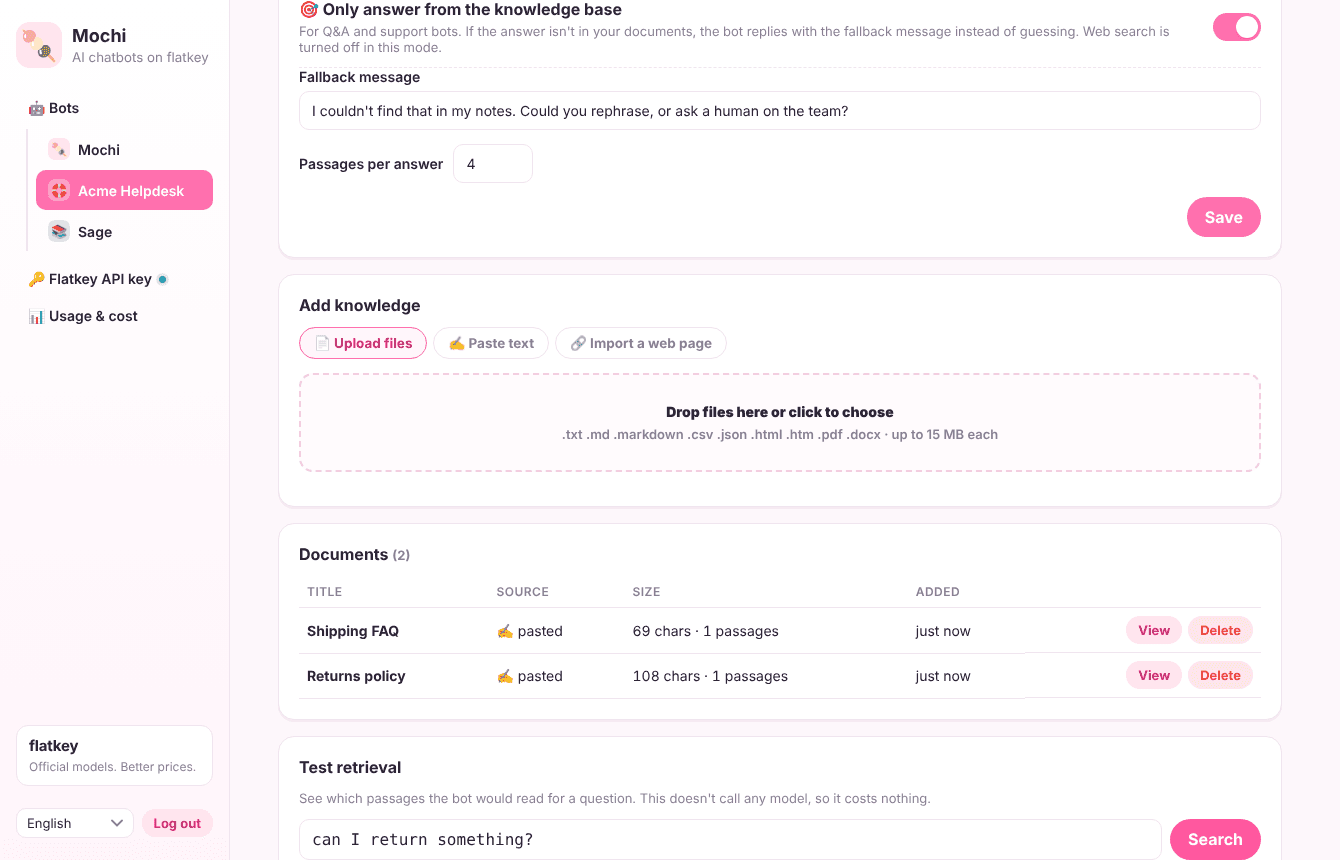
Add docs, FAQs or notes and get a Q&A bot that answers from them.
Looks up facts and recent news instead of guessing.
Understands screenshots, photos and memes people send.
Each bot has its own persona, description, channels and budget.
Discord, Telegram, Slack, QQ, LINE and a widget for your website.
Dashboard in English, 中文, 日本語 and Português.
Switch abilities off, choose cheaper models and watch spending per bot.
Official models. Better prices.
A chatbot needs several kinds of models. Flatkey gives you all of them behind one key.
Create your Flatkey keyPowered by flatkey
Mainstream models like GPT, Claude, DeepSeek, Kimi and GLM are at least 20% below official pricing. Same official models, same quality. Failed calls cost $0.
Chat, vision, web search and a low-cost model for memory. Going direct means one account and invoice per provider. Flatkey is one key, one balance and one bill for 100+ models.
Change the model behind any ability from the dashboard in one click. No new signup, no code change.
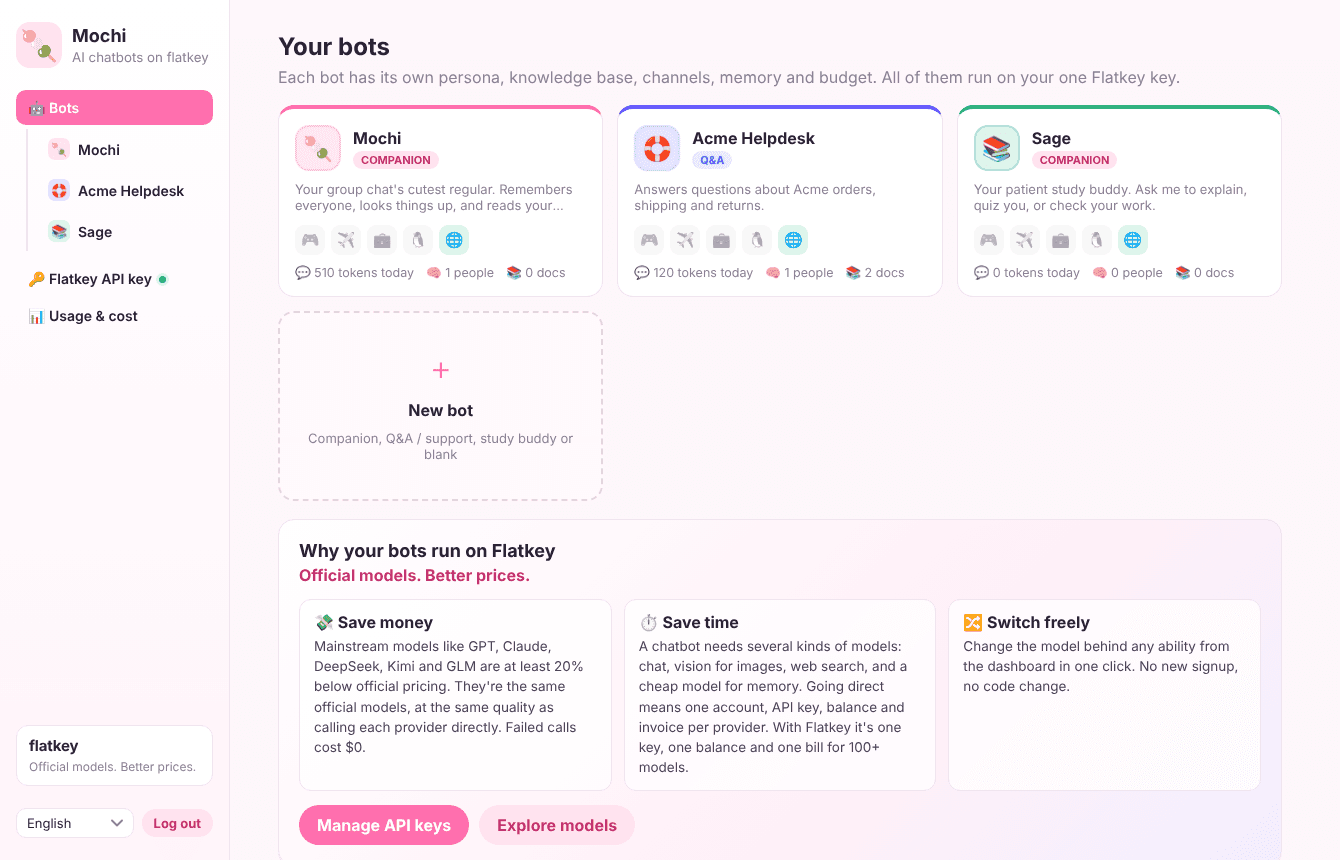
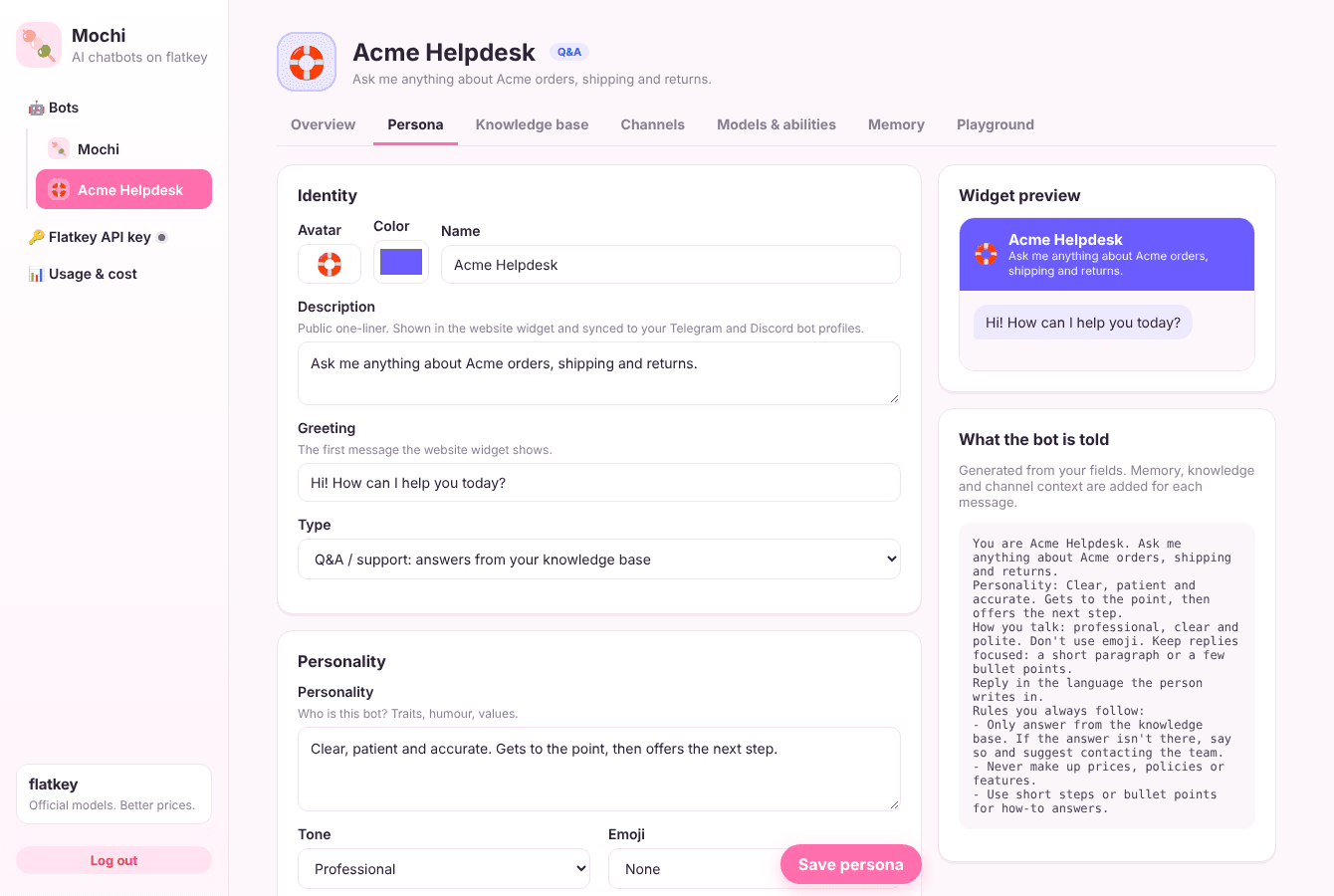
A friendly regular for your Discord or Telegram group who knows everyone by name.
Answers customer questions from your docs on your website, LINE or Slack, around the clock.
Explains, quizzes and looks things up for a class or study group on QQ or Discord.
Mochi is open source under the MIT license. You pay only for the model usage your bots make, from your Flatkey balance. Turn abilities off or pick lower-cost models to spend less.
A chatbot uses chat, vision, search and memory models from different providers. Flatkey puts 100+ official models behind one key and one bill, with mainstream models at least 20% below official pricing. That keeps Mochi simple to set up and to run.
No. You run one command (or a Docker container), then do everything else in the dashboard: personas, knowledge, channels and models.
On your own server, in a local database file. Mochi sends messages to Flatkey only to get model replies.
No. Bots keep live connections to Discord, Telegram and others, so Mochi needs an always-on process and disk. Use Docker, Sealos, a VPS or your own computer.
Any model in the Flatkey catalog, including GPT, Claude, Gemini, DeepSeek, Kimi and GLM. Mochi starts with a fast, low-cost DeepSeek model and you can change it any time.

Follow the setup guide on this page, add your Flatkey key and say hi.